


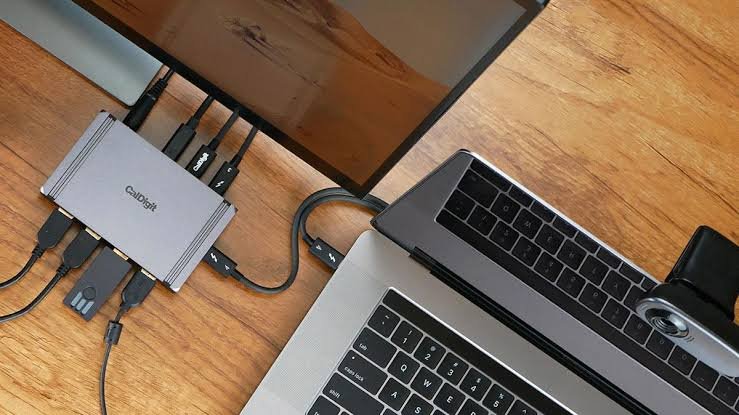
Thunderbolt docks expand a laptop’s connectivity by adding high-speed ports, support for multiple external displays, wired networking, and fast storage through a single cable connection. They help create a cleaner, more productive workspace while providing the bandwidth needed for demanding professional and creative workloads.
This guide covers the best Thunderbolt docks for laptops, comparing options for different port selections, display support, charging capabilities, and budgets. It also highlights the key factors to consider when choosing the right Thunderbolt dock for your laptop setup.
1. Dell Pro Thunderbolt 4 Smart Dock Sd25tb4

The Dell Pro Thunderbolt 4 Smart Dock SD25TB4 is ideal for professionals and tech enthusiasts who require a powerful and versatile docking station to streamline their workspace. If you frequently connect multiple displays, high-speed peripherals, and need reliable network connectivity, this dock is designed to enhance your productivity and simplify your setup.
Pros:
- Supports up to 4 displays in 4K resolution with 2x DisplayPort 1.4 and HDMI 2.1 outputs
- Provides 130W power delivery for fast charging of laptops and devices
- Equipped with 2x Thunderbolt 4 ports for ultra-fast data transfer and daisy-chaining
- Includes 2.5GbE Ethernet for high-speed wired network connectivity
- Incorporates Wi-Fi support to maintain wireless internet connections
- Features a sustainable design with durable materials
- Compact and lightweight with sleek black/white color options
Cons:
- May be overkill for users who only need basic docking capabilities
- Premium price point compared to simpler docking stations
- Limited to devices with USB-C or Thunderbolt 4 compatibility
The Dell Pro Thunderbolt 4 Smart Dock SD25TB4 boasts a range of advanced features that cater to demanding workflows. Its ability to support four simultaneous 4K displays allows users to expand their visual workspace dramatically, improving multitasking and productivity. The inclusion of the latest Thunderbolt 4 technology ensures lightning-fast data transfers, making it easier to handle large files and complex projects efficiently.
Additionally, the dock delivers up to 130W of power, which means it can comfortably charge high-performance laptops while powering multiple connected devices. The 2.5GbE Ethernet port provides a reliable and fast wired internet connection, essential for uninterrupted video conferencing or large file downloads. The combination of a sustainable design and a compact form factor makes this dock both environmentally conscious and convenient to carry or fit into any workspace.
To buy this product, click here.
2. Anker Prime Tb5 Docking Station

The Anker Prime TB5 Docking Station is ideal for professionals and tech enthusiasts who require a high-performance docking solution to expand their laptop’s connectivity. If you own a Thunderbolt 5 or Thunderbolt 4 laptop and need a reliable, fast, and versatile dock to support multiple displays, fast data transfer, and power delivery, this docking station is tailored for you. It’s perfect for users looking to enhance productivity with multiple peripherals and 8K dual display capabilities.
Pros:
- Supports ultra-fast 120Gbps max transfer speeds for seamless data handling.
- 140W max charging power delivery to keep laptops and devices powered.
- Compact design with effective cooling system to prevent overheating during heavy use.
- Supports up to 8K dual display, ideal for high-resolution workspaces.
- Offers 14-in-1 connectivity including multiple USB ports, HDMI, and Ethernet.
Cons:
- Relatively higher price point compared to simpler docking stations.
- May require Thunderbolt 5 or 4 compatible laptop to unlock full potential.
The Anker Prime TB5 Docking Station boasts an impressive array of features designed to boost your workstation efficiency. Its 14-in-1 connectivity allows users to connect a variety of peripherals including USB devices, external displays, and network connections, all through a single hub. The dock’s ability to support up to 8K dual displays makes it an excellent choice for creative professionals who need stunning visual clarity and expansive screen real estate for their projects. Additionally, the integrated cooling system ensures the dock remains cool and reliable even during intensive tasks.
Moreover, the dock provides a powerful 140W max charging output, which ensures that your laptop and connected devices stay charged without needing separate power adapters. The transfer speeds of up to 120Gbps enable quick file transfers, reducing wait times and improving workflow. Its compact and sleek gray design fits neatly on any desk setup without taking up much space, making it both a functional and aesthetically pleasing accessory. Overall, the Anker Prime TB5 is a versatile and robust docking station designed to meet the demands of modern laptop users.
To buy this product, click here.
3. Wavlink Thunderbolt 4 Dock
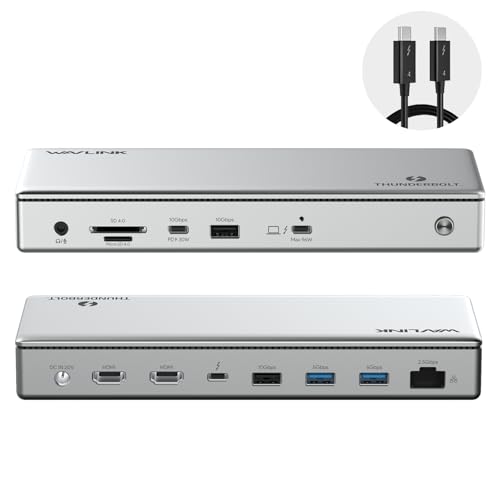
The WAVLINK Thunderbolt 4 Dock is ideal for professionals and tech enthusiasts who require a high-performance, versatile docking station for their Windows or Mac laptops. If you need seamless connectivity with multiple peripherals, high-speed data transfer, and support for multiple high-resolution displays, this dock is designed to meet those demanding needs. It is especially beneficial for users who want a clutter-free workspace with powerful charging capabilities and extensive port options.
Pros:
- Supports dual 4K HDMI monitors or a single 8K display for superior visual experience
- Provides up to 100W charging to keep laptops powered efficiently
- Thunderbolt 4 certified ensuring maximum compatibility and speed
- Driverless setup for easy plug-and-play use
- Includes 4 USB ports for connecting multiple devices simultaneously
- Equipped with 2.5G Ethernet for ultra-fast and stable internet connection
- Includes SD and MicroSD card readers for convenient media access
- Elegant silver design complements modern workspaces
Cons:
- May be priced higher compared to basic docking stations
- Limited to devices that support Thunderbolt 4 for full functionality
- Relatively large size may take up more desk space
The WAVLINK Thunderbolt 4 Dock delivers exceptional versatility by supporting both dual 4K HDMI monitors and a single 8K display, making it perfect for creative professionals and multitaskers who demand crystal-clear visuals. Its Thunderbolt 4 certification guarantees blazing-fast data transfer rates up to 40Gbps, which significantly reduces waiting times when transferring large files or streaming high-definition content. The dock’s driverless design allows for a hassle-free setup, enabling users to get started quickly without compatibility issues.
Beyond display and data capabilities, this docking station offers a comprehensive charging solution with up to 100W power delivery, ensuring your laptop stays charged during intensive work sessions. The inclusion of 4 USB ports, 2.5G Ethernet, and SD/MicroSD card slots enhances connectivity options, allowing users to connect multiple peripherals like external drives, cameras, and wired networks seamlessly. Its sleek silver finish not only adds a professional touch but also integrates well with modern office aesthetics, making it a valuable addition to any workspace.
To buy this product, click here.
4. Dell Thunderbolt Dock

The Dell Thunderbolt Dock- WD19TBS 130w Power Delivery is ideal for professionals and tech enthusiasts who require a powerful, versatile docking solution to expand their laptop connectivity. It is perfect for users who need to connect multiple peripherals, transfer data quickly, and charge their devices efficiently, especially those with compatible Dell laptops or Thunderbolt-enabled systems.
Pros:
- Supports 130w Power Delivery for fast and efficient charging.
- Compact and sleek black design with dimensions suitable for any workspace.
- Multiple connectivity options to easily connect monitors, storage devices, and peripherals.
- Lightweight at 4.0 pounds, making it portable for on-the-go use.
- Reliable brand and manufacturer: Dell Technologies.
Cons:
- May be priced higher than basic docking stations due to advanced features.
- Compatibility limited mainly to Dell laptops and Thunderbolt-enabled devices.
- Relatively bulky compared to ultra-compact docks, with dimensions of 12.0 x 11.4 x 2.5 inches.
The Dell Thunderbolt Dock- WD19TBS offers robust connectivity options, making it an essential accessory for users who need to streamline their workspace. With its 130w power delivery capability, it ensures that laptops and connected devices receive sufficient power, reducing downtime and enhancing productivity. The dock supports high-speed data transfers and multiple display outputs, enabling users to work efficiently with several peripherals simultaneously.
Designed with both functionality and aesthetics in mind, this dock fits neatly into any professional setting. Its durable construction and trusted Dell Technologies branding provide peace of mind regarding performance and reliability. Overall, this docking station enhances user convenience by consolidating multiple cables and devices into a single, easy-to-manage hub.
To buy this product, click here.
5. Lenovo Thinkpad Universal Thunderbolt 4 Dock

The Lenovo ThinkPad Universal Thunderbolt 4 Dock is ideal for professionals and tech enthusiasts who require a powerful and versatile docking solution. If you need to connect multiple displays, transfer data quickly, and charge your devices efficiently, this dock is perfect for users looking to enhance their workstation productivity and streamline their workspace.
Pros:
- Supports up to 4 displays for expansive multitasking capabilities
- Dynamic Power Charging up to 100W ensures fast and efficient device charging
- Compact and sleek black design that fits seamlessly into any professional setting
- Equipped with the latest Thunderbolt 4 technology for ultra-fast data transfer and connectivity
- Lightweight and portable with dimensions of 1.0 inches height, 3.0 inches width, and 6.0 inches length
Cons:
- May be priced higher compared to simpler docking solutions
- Limited to users with Thunderbolt 4 compatible devices for full functionality
The Lenovo ThinkPad Universal Thunderbolt 4 Dock offers impressive support for up to four displays, making it an excellent choice for those who require extensive screen real estate for multitasking or complex workflows. This feature enhances productivity by allowing users to organize multiple applications and data streams simultaneously without clutter. Additionally, its Dynamic Power Charging capability of up to 100W means users can keep their laptops and connected devices fully powered without needing separate chargers, simplifying cable management and reducing desk clutter.
Designed with portability in mind, the dock’s compact size and lightweight build make it easy to carry between different workstations or travel locations. The integration of Thunderbolt 4 technology ensures lightning-fast data transfer rates and broad compatibility with modern devices, future-proofing your workspace setup. Overall, this dock is a robust, reliable, and efficient accessory for anyone looking to optimize their desktop environment with high-speed connectivity and multiple display support.
To buy this product, click here.
6. Dell Sd25tb4 Pro Thunderbolt 4 Smart Dock
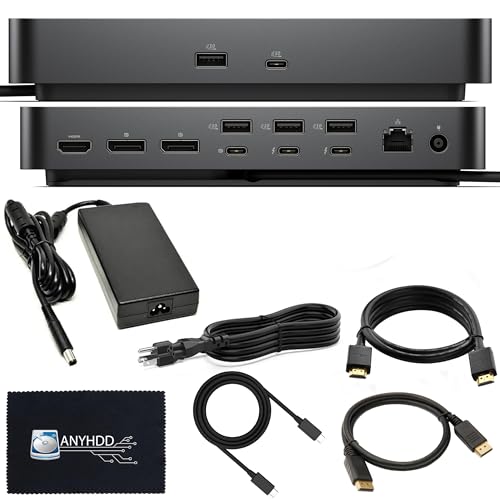
The Dell SD25TB4 Pro Thunderbolt 4 Smart Dock is ideal for professionals and tech enthusiasts who require a powerful and versatile docking solution. If you need to connect multiple high-resolution displays, fast data transfer, and seamless device charging in a compact and reliable hub, this docking station is perfect for you.
Pros:
- Supports up to 8K display resolution for exceptional visual clarity.
- Includes a 180W adapter ensuring sufficient power delivery to connected devices.
- Comes with multiple connectivity options like HDMI, DisplayPort, and Thunderbolt cable.
- Offers a 3 years warranty providing long-term peace of mind.
- Compact and stylish black design with cloth detailing for durability and aesthetics.
Cons:
- Weighs approximately 4.06 pounds, which might be slightly heavy for portable use.
- Limited brand recognition as it is manufactured by ANYHDD, which may concern some buyers.
The Dell SD25TB4 Pro Thunderbolt 4 Smart Dock offers impressive features tailored to enhance productivity. Its support for 8K display makes it an excellent choice for graphic designers, video editors, and anyone who demands high-resolution visuals. The multiple ports, including HDMI and DisplayPort, allow users to connect various devices simultaneously, streamlining workspace setups.
In addition to connectivity, this docking station provides robust power delivery through its 180W adapter, ensuring that laptops and peripherals remain charged without interruption. The inclusion of a Thunderbolt cable enhances data transfer speeds, making file sharing and backups faster and more efficient. Its sleek black design with cloth accents adds a professional touch to any desk while maintaining durability. Overall, this dock combines functionality, style, and reliability, backed by a solid 3-year warranty.
To buy this product, click here.
7. Plugable Thunderbolt 5 Dock

The Plugable Thunderbolt 5 Dock is ideal for professionals and tech enthusiasts who demand high-performance connectivity and versatile expansion for their MacBook Pro/Air or Windows laptops. If you need to connect multiple high-resolution displays, transfer data at lightning speeds, and charge your laptop simultaneously, this dock is designed for you. It is perfect for users who require a reliable, driverless, and fanless docking solution with advanced features like dual HDMI 2.1 outputs and 2.5GbE networking.
Pros:
- Supports dual HDMI 2.1 displays up to 8K at 60Hz or 4K at 144Hz for stunning visuals
- Powerful 140W laptop charging to keep your device fully powered
- 16-in-1 connectivity offering extensive port options for all peripherals
- Fanless and driverless design ensures silent operation and easy setup
- Compact Space Gray design complements modern laptop aesthetics
- TAA compliant, suitable for government and enterprise use
Cons:
- Relatively higher price point compared to simpler docking stations
- May require Thunderbolt 5 compatible devices to unlock full performance
- Limited to two HDMI outputs, no DisplayPort included
The Plugable Thunderbolt 5 Dock stands out with its impressive ability to support dual 8K HDMI 2.1 displays, making it an excellent choice for users needing ultra-high-definition visuals with smooth refresh rates. Its 16-in-1 port configuration offers extensive versatility, from high-speed data transfers to reliable wired networking with 2.5GbE. The dock’s fanless and driverless design enhances user convenience by minimizing noise and eliminating complex installation procedures. Its compact dimensions and sleek Space Gray finish ensure that it blends seamlessly into any workspace setup.
Additionally, the dock delivers a robust 140W laptop charging capability, which means users can power their high-performance laptops while simultaneously connecting multiple devices. Being TAA compliant also makes it ideal for professionals in government or corporate environments who require trustworthy and compliant hardware solutions. Overall, this docking station provides an all-in-one solution for maximizing productivity and connectivity, especially for creative professionals and power users with demanding workstation needs.
To buy this product, click here.
8. Hp Usb-c Dock G5-11-in-1 Adapter

The HP USB-C Dock G5-11-in-1 Adapter is ideal for professionals and tech enthusiasts who require a versatile docking solution compatible with both USB-C and Thunderbolt-enabled laptops, PCs, and notebooks. If you are someone who needs seamless charging, networking, and data transfer capabilities all in one compact device, this dock is designed to simplify your workspace and enhance productivity.
Pros:
- Supports both USB-C and Thunderbolt-enabled devices for broad compatibility
- Offers 11-in-1 functionality including charging, networking, and data transfer
- Compact and lightweight design for easy portability
- Enables secure and remote management ideal for IT environments
- Robust build quality from trusted HP brand
Cons:
- Relatively higher weight compared to some ultra-portable docks
- Limited to black color option only
- May require firmware updates for optimal compatibility with certain devices
The HP USB-C Dock G5 stands out with its extensive set of ports, allowing users to connect multiple peripherals simultaneously. Its ability to handle high-speed data transfers and provide stable power delivery ensures that laptops remain charged while connected to external displays, keyboards, and network interfaces. This versatility makes it an excellent companion for both office and remote work scenarios.
Designed with a compact footprint of just 1.771 inches in height and 4.803 inches in width and length, the dock fits easily on any desk without clutter. The sturdy black finish and quality manufacturing by Hewlett Packard Office offer durability and a professional look. Additionally, its support for secure and remote management enables IT administrators to maintain control and troubleshoot connected devices efficiently, enhancing security and reducing downtime.
To buy this product, click here.
Frequently Asked Questions
What Is The Best Thunderbolt Dock For Multiple 4k Displays?
The Dell Pro Thunderbolt 4 Smart Dock SD25TB4 supports up to four 4K displays. It includes HDMI 2. 1 and DisplayPort 1. 4 ports for crisp visuals. This dock is ideal for users needing high-resolution multi-monitor setups with reliable performance and power delivery.
Which Thunderbolt Dock Offers The Highest Charging Power?
The Anker Prime TB5 Dock provides up to 140W charging power. It supports fast charging for laptops while running multiple peripherals. This dock combines high-speed data transfer with powerful charging, making it perfect for demanding users.
Are Thunderbolt 4 Docks Compatible With Mac And Windows?
Yes, docks like WAVLINK Thunderbolt 4 are certified for both Mac and Windows. They offer plug-and-play functionality without drivers. This cross-platform support ensures seamless connectivity and ease of use for varied laptop brands.
How Many Usb Ports Do Top Thunderbolt Docks Typically Include?
Most premium docks like WAVLINK and Dell WD19TBS feature 4 to 6 USB ports. These support USB-C and USB-A devices for versatile peripheral connections. Multiple ports enhance productivity by accommodating external drives, keyboards, and mice simultaneously.
Can Thunderbolt 5 Docks Handle 8k Video Output?
Yes, the Anker Prime TB5 and Plugable Thunderbolt 5 docks support up to 8K video resolution. They include HDMI 2. 1 ports for stunning display quality. These docks cater to professional creators requiring ultra-high-definition video workflows.
Do Thunderbolt Docks Support Fast Ethernet Connections?
Many docks, including Dell SD25TB4 and Plugable TBT-UDH2, offer 2. 5GbE Ethernet ports. These enable faster and more stable wired network speeds than standard Gigabit Ethernet. Ideal for users needing reliable high-speed internet connections.
Conclusion
Choosing the right Thunderbolt dock can greatly improve your laptop’s performance and connectivity. The options listed offer a mix of features like multiple 4K or 8K display support, fast charging, and reliable data transfer speeds. Whether you need a compact dock for travel or a powerful station for your workstation, there is a model to fit your needs.
Consider the number of ports, charging power, and compatibility with your laptop before deciding. Investing in a quality Thunderbolt dock will simplify your workspace and increase productivity. Remember, a good dock helps you connect all your devices easily and keeps your laptop charged.
Take your time to pick the dock that matches your budget and requirements. With the right choice, your laptop setup will be more efficient and enjoyable.
