


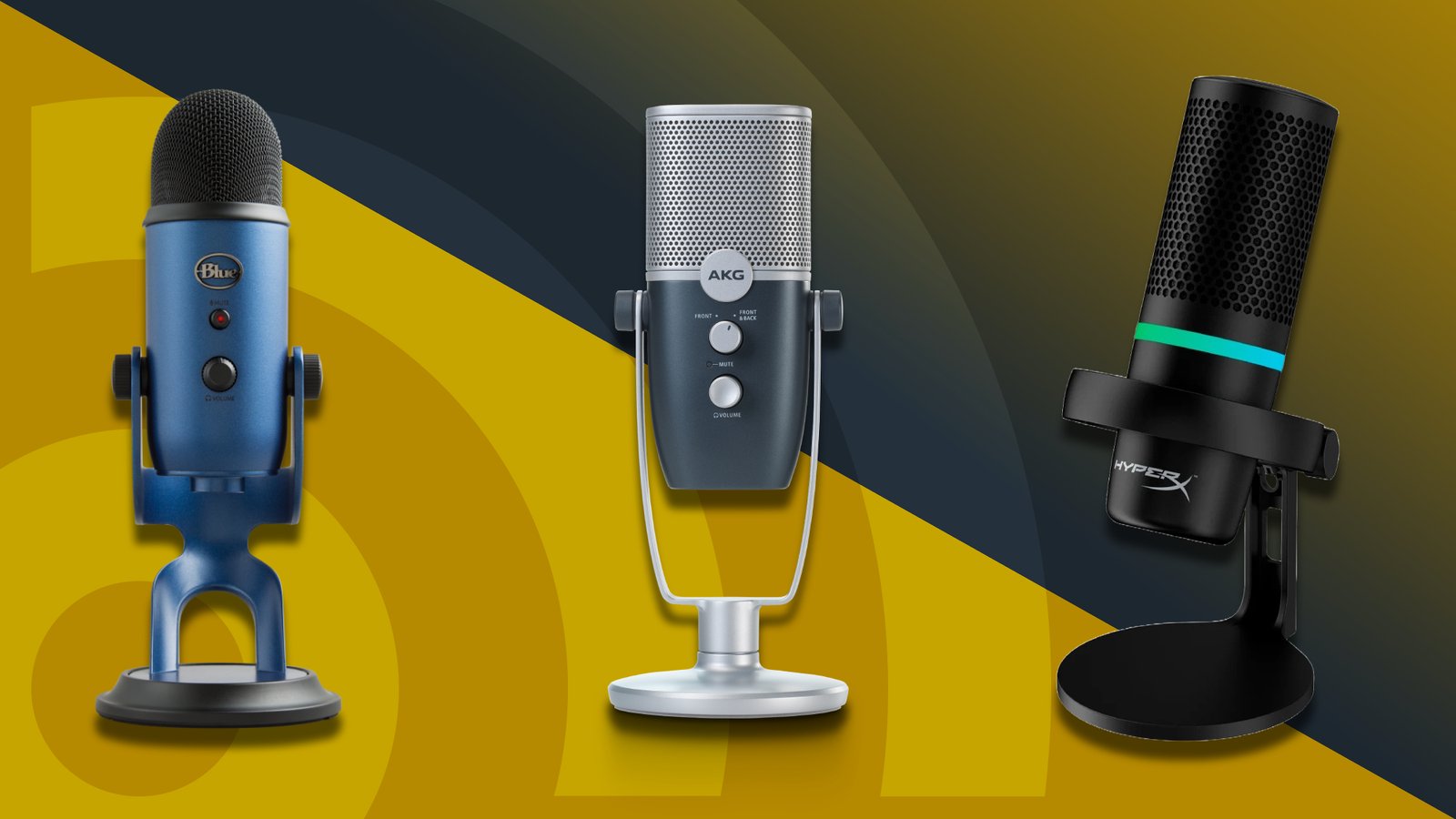
A quality external laptop microphone can significantly improve voice clarity during virtual meetings, online classes, and video calls compared to most built-in laptop microphones. Clear audio helps you communicate more effectively while reducing background noise and distractions.
This guide covers the best laptop microphones for meetings, comparing options for different microphone types, connectivity options, and budgets. It also highlights the key factors to consider when choosing the right microphone for professional and everyday communication.
1. Cmteck Usb Computer Microphone G009

The CMTECK USB Computer Microphone G009 is ideal for individuals seeking a high-quality, noise-cancelling microphone for various uses such as online chatting, home studio recording, podcasting, gaming, and content creation on platforms like Skype and YouTube. If you are a student, professional, gamer, or content creator looking for a reliable and easy-to-use desktop microphone compatible with both Windows and Mac systems, this microphone is a great choice.
Pros:
- Noise-cancelling technology ensures clear audio by reducing background noise.
- Compatible with PC and laptop, supporting both Windows and Mac operating systems.
- Compact and lightweight design with dimensions of approximately 4.4 x 4.2 x 2.7 inches and weighing just under half a pound.
- Convenient mute function for quick control during recordings or calls.
- Easy plug-and-play USB connectivity without the need for additional drivers.
Cons:
- The microphone’s build is primarily plastic, which may feel less durable compared to premium metal models.
- No adjustable arm or stand included, limiting placement flexibility.
- Limited advanced audio settings or controls on the device itself.
The CMTECK USB Computer Microphone G009 boasts noise-cancelling recording capabilities that significantly enhance voice clarity by minimizing ambient sounds. This makes it particularly suitable for environments with background noise, such as busy homes or shared workspaces. Its plug-and-play USB interface ensures that users can quickly connect it to their PC or laptop without complicated setup processes, making it perfect for beginners and professionals alike.
Additionally, the microphone’s compact size and lightweight construction make it an excellent choice for users with limited desk space. The inclusion of a mute function adds a layer of convenience and privacy control during live sessions or recordings. Whether you are podcasting, gaming, or participating in online meetings, this microphone delivers clear and consistent sound quality, enhancing your overall communication and content creation experience.
To buy this product, click here.
2. Fifine Usb Microphone

The FIFINE USB Microphone K669B is ideal for content creators, podcasters, streamers, and professionals who need a reliable and high-quality recording tool compatible with both MAC OS and Windows. If you are looking for a versatile microphone that delivers clear vocals for voice overs, streaming, meetings, or YouTube videos, this metal condenser microphone is a great choice. Its plug-and-play design makes it perfect for beginners and experienced users alike.
Pros:
- High-quality cardioid condenser microphone for clear and focused audio capture
- Compatible with both MAC OS and Windows operating systems
- Compact and lightweight design (0.35 pounds) for easy portability
- Durable metal build ensures long-lasting use
- Simple USB plug-and-play setup with no additional drivers required
Cons:
- Limited dimensions information may affect stand or mounting decisions
- No built-in headphone jack for real-time monitoring
- Not ideal for capturing multi-directional sound due to cardioid pickup pattern
The FIFINE K669B USB Microphone features a sturdy metal condenser capsule designed to capture clear and detailed sound, making it perfect for various recording scenarios. Its cardioid pickup pattern effectively isolates the main sound source while minimizing background noise, which benefits users during vocal recordings, streaming sessions, and online meetings. The microphone’s compatibility with both MAC OS and Windows systems ensures seamless integration with most computers without complicated installations.
Additionally, the microphone’s compact size and lightweight design make it a convenient option for users who need to move their recording setup or travel. The plug-and-play USB connectivity means users can easily connect it to their laptops or desktops without the hassle of extra drivers or software. Overall, the FIFINE USB Microphone K669B provides excellent value for content creators seeking a reliable and easy-to-use recording solution with professional audio quality.
To buy this product, click here.
3. Logitech Brio 101 Webcam

The Logitech Brio 101 Full HD 1080p Webcam is ideal for professionals, streamers, and gamers who require high-quality video and clear audio during meetings, streaming sessions, or gaming chats. If you use platforms like Zoom, Microsoft Teams, or the Nintendo Switch 2’s new GameChat Mode, this webcam is designed to enhance your communication experience with its advanced features and compatibility.
Pros:
- Delivers Full HD 1080p video quality ensuring sharp and clear visuals.
- Equipped with a built-in microphone for crystal-clear audio without needing extra accessories.
- Includes a privacy shutter for secure and easy camera cover when not in use.
- Compatible with multiple platforms such as Zoom, Microsoft Teams, and Nintendo Switch 2.
- Compact and lightweight design (Black color, dimensions approximately 2.62 x 2.87 x 1.26 inches, weight 0.31 pounds) for easy portability.
Cons:
- Requires a USB-A port, which may limit compatibility with some newer devices lacking this port.
- Does not support 4K resolution, which some high-end webcams offer.
The Logitech Brio 101 webcam combines excellent video resolution with a user-friendly design, making it perfect for those who want a professional-grade camera without complicated setup. Its Full HD 1080p quality ensures that every detail in your video calls or streams is crisp, while the built-in mic guarantees your voice is heard clearly. The inclusion of a privacy shutter adds an extra layer of security, allowing users to physically block the camera lens when not in use.
Designed to be versatile, this webcam works seamlessly across popular communication platforms like Zoom and Microsoft Teams, as well as the innovative Nintendo Switch 2’s GameChat Mode, catering to a wide range of users from business professionals to avid gamers. Its compact size and lightweight build make it a convenient accessory for desktop, laptop, or PC setups, enabling users to maintain high-quality video interactions anywhere.
To buy this product, click here.
4. Usb Microphone

The USB Microphone No Speaker by AIRHUG is ideal for individuals who need a reliable and high-quality mic for online calls, virtual classes, and video recordings. Whether you are a student, remote worker, content creator, or professional attending frequent video conferences, this desktop computer mic offers clear audio capture with user-friendly features tailored to enhance your communication experience.
Pros:
- AI Noise Reduction technology for crystal-clear sound quality.
- Convenient Mute Button with LED Indicator for quick audio control.
- Plug & Play functionality ensures easy setup with no drivers required.
- Omnidirectional microphone captures sound from all directions for versatile use.
- Lightweight design at just 0.33 pounds for portability and ease of use.
Cons:
- Does not include built-in speakers, requiring separate audio output devices.
- Limited color and design options available.
This USB microphone by AIRHUG stands out with its advanced AI noise reduction feature, which significantly minimizes background sounds, allowing your voice to come through clearly during calls and recordings. The mute button equipped with an LED indicator provides an intuitive way to manage audio input instantly, ensuring privacy and reducing disruptions. Its omnidirectional pickup pattern allows users to capture sound evenly from all directions, making it ideal for group conversations or solo recordings.
The microphone’s plug & play design simplifies the setup process, making it compatible with most laptops and desktop computers without the need for additional software. Its lightweight build ensures it can be easily transported or adjusted on your desk without hassle. Overall, this external microphone is a practical solution for anyone looking to enhance their audio quality for online classes, remote work, or video content creation.
To buy this product, click here.
5. Cmteck Usb Computer Microphone

The CMTECK USB Computer Microphone is ideal for users seeking a reliable and easy-to-use desktop mic for PC and laptop setups. Whether you are a remote worker, content creator, gamer, or student attending online classes, this plug-and-play mic offers convenient functionality without the need for complex installation, making it perfect for both beginners and professionals.
Pros:
- Plug & Play design allows instant setup with no drivers required.
- Omnidirectional pickup captures sound from all directions for clear audio.
- 360 Degree Adjustable Gooseneck provides flexible positioning for optimal voice capture.
- Mute Button with LED Indicator offers quick muting with visual confirmation.
- Noise-Cancelling technology reduces background noise for clearer communication.
- Compatible with both Windows and Mac operating systems.
- Compact and lightweight design enhances portability and desk space management.
Cons:
- Limited to desktop use due to wired USB connection.
- No built-in stand; relies on base stability which may cause slight movement.
- May not be suitable for professional studio recording environments.
The CMTECK USB Computer Microphone features a sleek and adjustable 360-degree gooseneck that allows users to position the microphone precisely for the best audio capture. This flexibility enhances user comfort and ensures clear voice transmission during calls, recordings, or streaming. The omnidirectional pickup pattern ensures that the microphone picks up sound evenly from all directions, making it ideal for group discussions or solo use.
Equipped with a convenient mute button that includes an LED indicator, this microphone allows users to quickly silence the mic without fumbling through software settings. Its noise-cancelling capability minimizes background sounds, providing crystal-clear audio that is essential for professional presentations, gaming, and online communication. Compatible with both Windows and Mac, it offers wide usability across different systems, making it a versatile choice for a variety of users.
To buy this product, click here.
6. Mini Usb Microphone

The Mini USB Microphone for Laptop & Desktop is ideal for users who need a compact and easy-to-use audio input device. Whether you are a student attending online classes, a professional working from home, or a content creator looking for clear voice recording, this plug-and-play microphone offers a hassle-free solution for improved sound quality. Its small size and simple setup make it perfect for those who want an efficient microphone without complicated installation.
Pros:
- Compact and lightweight design for easy portability
- Plug-and-play functionality requires no additional drivers
- Compatible with both laptops and desktop computers
- Clear audio capture suitable for calls, recordings, and streaming
- Durable build from reputable brands DUNGZDUZ and ChanGeek
Cons:
- Limited advanced features compared to professional microphones
- May not be suitable for high-end audio production
- Fixed cable length could restrict placement options
Featuring a sleek black design with compact dimensions (height: 1.88976 inches, width: 0.31496 inches, length: 0.70866 inches), the Mini USB Microphone fits comfortably on any workspace without causing clutter. Its lightweight construction (0.110231131 pounds) ensures it can be easily carried with your laptop or desktop setup, making it an excellent choice for users on the go. The plug-and-play capability means you can simply connect it via USB and start using it immediately, eliminating the frustration of driver installations or complicated configurations.
The microphone’s compatibility with multiple operating systems and devices allows seamless integration for a variety of users. Whether you are participating in video conferences, recording podcasts, or chatting with friends, the microphone delivers clear and reliable audio quality. Manufactured by ChanGeek under the trusted DUNGZDUZ brand, this mini microphone combines practicality with durability, ensuring long-lasting performance for everyday use.
To buy this product, click here.
7. Computer Speakers With Microphone For Desktop Pc
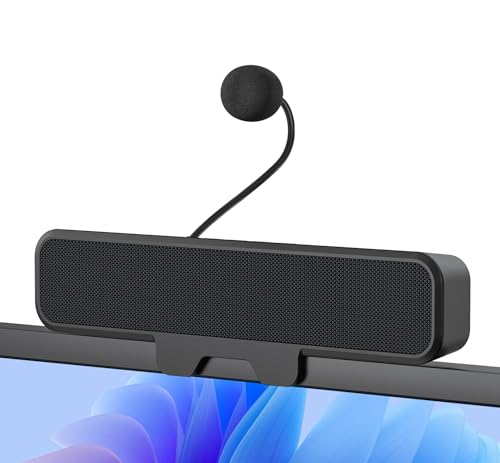
The Computer Speakers with Microphone for Desktop PC by Inwa is ideal for users who need a compact and versatile audio solution. Whether you are a gamer seeking immersive sound, a professional attending online meetings, or a student participating in virtual classes, these USB monitor speakers with clip are designed to enhance your audio experience while keeping your workspace organized.
Pros:
- Easy-to-use clip design that securely attaches to your monitor
- Clear stereo sound and bass for an immersive audio experience
- Built-in microphone suitable for meetings, gaming, and online learning
- Compact and lightweight, saving desk space with dimensions of 1.26″ height, 1.85″ width, 9.0″ length
- Wired connection ensures stable and lag-free audio transmission
Cons:
- Limited color option, available only in black
- Wired design may restrict placement flexibility compared to wireless options
These wired laptop sound bar speakers by Inwa stand out with their practical clip-on feature, making them an excellent choice for desktop users looking to save space and reduce clutter. The stereo sound combined with enhanced bass delivers rich audio quality that elevates gaming, video calls, and multimedia consumption. The integrated microphone is a convenient addition, providing clear voice input for online meetings and virtual learning environments without requiring an extra headset.
Constructed with portability and ease of use in mind, the speakers’ compact size and lightweight design allow users to easily attach them to their monitor and adjust as needed. This ensures that the audio source is optimally positioned for the best listening and speaking experience. The USB connectivity guarantees a simple plug-and-play setup without the hassle of additional drivers or batteries, making it a reliable and user-friendly accessory for anyone working or playing on a PC or laptop.
To buy this product, click here.
8. Logitech H390 Wired Headset

The Logitech H390 Wired Headset is an ideal choice for professionals, students, and remote workers who require clear audio communication during calls, online meetings, or virtual classes. Those who prioritize comfort, noise cancellation, and easy connectivity with their PC, laptop, or Chromebook will find this headset particularly beneficial. It is perfect for users seeking a reliable wired headset with in-line controls for seamless audio management.
Pros:
- Noise cancelling microphone ensures clear voice transmission by reducing background noise.
- Convenient in-line controls allow quick adjustments to volume and call management without interrupting workflow.
- USB-A connectivity offers easy plug-and-play compatibility with most computers and Chromebooks.
- Comfortable over-ear design with padded ear cups for extended wear without discomfort.
- Durable build quality from a trusted brand, Logitech.
Cons:
- Wired design limits mobility compared to wireless alternatives.
- Limited color options, available only in black.
- May not be compatible with devices lacking USB-A ports without an adapter.
The Logitech H390 Wired Headset features a built-in noise cancelling microphone that effectively filters out ambient noise, making it ideal for clear and professional communication. Its stereo headphones deliver high-quality sound, enhancing the user experience whether you’re listening to music, attending virtual meetings, or engaging in online learning. The USB-A connection ensures hassle-free setup and reliable performance without the need for additional drivers or software.
Additionally, the headset is designed with user comfort in mind, featuring adjustable headbands and cushioned ear pads that allow for long hours of use without strain. The in-line controls provide convenient access to volume adjustments and mute functions, enabling users to manage calls efficiently. Overall, this headset combines excellent audio performance with practical features, making it a valuable accessory for anyone seeking dependable wired audio solutions.
To buy this product, click here.
Frequently Asked Questions
What Is The Best Microphone For Laptop Meetings?
The FIFINE USB Microphone K669B offers excellent sound clarity and noise cancellation. It is perfect for meetings, streaming, and voice overs. Compatible with Windows and Mac, it ensures clear communication in any online setting.
How Does Noise-cancelling Improve Meeting Audio Quality?
Noise-cancelling microphones like the CMTECK USB reduce background noise. This results in clearer voice transmission during meetings. It enhances focus and reduces distractions for all participants.
Can Logitech Brio Webcam’s Built-in Mic Replace A Standalone Microphone?
Logitech Brio’s built-in mic is good for casual meetings. However, standalone mics like FIFINE K669B provide superior audio clarity. For professional meetings or recordings, external microphones are preferred.
Are Usb Microphones Plug-and-play With Laptops?
Yes, most USB microphones such as CMTECK and FIFINE are plug-and-play. They require no complex setup. Simply connect to your laptop, and they work instantly with popular apps.
Which Microphone Is Best For Multi-purpose Use Like Gaming And Podcasting?
CMTECK USB Computer Microphone is versatile for gaming, podcasting, and meetings. It features a mute button and adjustable gooseneck. It offers great sound quality across various uses.
What Features Matter Most In A Laptop Microphone For Meetings?
Key features include noise cancellation, clear sound, mute function, and plug-and-play compatibility. These ensure smooth, distraction-free communication during meetings. Models like Logitech H390 provide these essentials effectively.
Conclusion
Choosing the right laptop microphone can greatly improve your meeting experience. Clear sound helps others hear you well and makes communication smooth. The options listed offer various features like noise cancellation, easy plug-and-play setup, and adjustable designs. Whether you want a simple mic or a headset, there is something for everyone’s needs and budget.
Remember to check compatibility with your device before buying. Good audio quality reduces misunderstandings and saves time during calls. Investing in a reliable microphone is smart for frequent online meetings, classes, or streaming. Take your time to pick the one that fits your style and environment best.
This way, you ensure every conversation is clear and professional. With the right microphone, your voice will always come through strong and clear.
